Moises: The Musician's AI App
- 4.5
- Rating
- 50.00M
- Installs
- Free
- Price

 Analysis by App-foxy
I approached Moises as a working tool rather than a novelty: could it help me turn an existing song into something I could practice, arrange, edit, or pass on to another musician? Its place in Music & Audio is clear, but its real appeal is more focused than that label suggests. This is an app for taking a finished recording and opening it up into separate musical parts, so I can work with the material instead of simply listening to it.
That makes it especially interesting for singers, instrumentalists, beat makers, teachers, and anyone who learns by playing along. I would not describe it as a complete recording studio, and I would not choose it as my only tool for producing a polished release. I see it as an intelligent preparation and practice layer between the original track and the creative work I want to do next.
Moises Systems develops the app, which is free to install and suitable for Everyone. It has built a substantial audience, with an average rating of 4.6 from around 397 thousand ratings and more than 10 million installs. Those figures suggest that the central idea is useful to many people, but they do not remove the need to understand where the workflow is strong and where it becomes less convenient.
You May Also Like

 Blood Strike: 2.5 Anniversary
Blood Strike’s Loadouts Turn Every Drop Into a Tactical Gamble
A close look at Blood Strike’s custom loadouts: how fast access to signature weapons reshapes its battle royale rhythm, rewards preparation, and narrows the gap between fights.

 Pandora - Music & Podcasts
Pandora’s Music Is Easy to Start, but Harder to Recover
Pandora’s strength is its low-effort path from a seed to a station. Its weak spot is how much confidence it asks you to place in connection, setup, and quiet recovery.

 8 Ball Pool
 Is Built on Rivalries, Rematches, and Routine
A close look at the rivalries, rematches, shared routines, and unanswered safety questions that turn a quick pool match into a persistent mobile community.

 Samsung Music
’s Quiet Strength Is Playing What You Already Own
Its reach comes less from spectacle than from dependable access to a personal library. That simplicity is both the app’s strongest retention engine and its ceiling.

 AccuWeather: Weather Radar
AccuWeather Review: A Quick, Clear Forecast for Everyday Decisions
For everyday plans, the best forecast is the one you can understand quickly. AccuWeather makes rain timing, radar, and local conditions easy to act on, with a few trade-offs.

 Hill Climb Racing
Why Hill Climb Racing Still Turns Crashes Into One More Run
A tiny car, a bumpy hill and one more upgrade: Hill Climb Racing keeps resurfacing because its simple chaos makes every near-miss feel personal.
More From Our News Desk
View All News


From a finished song to a workable starting point
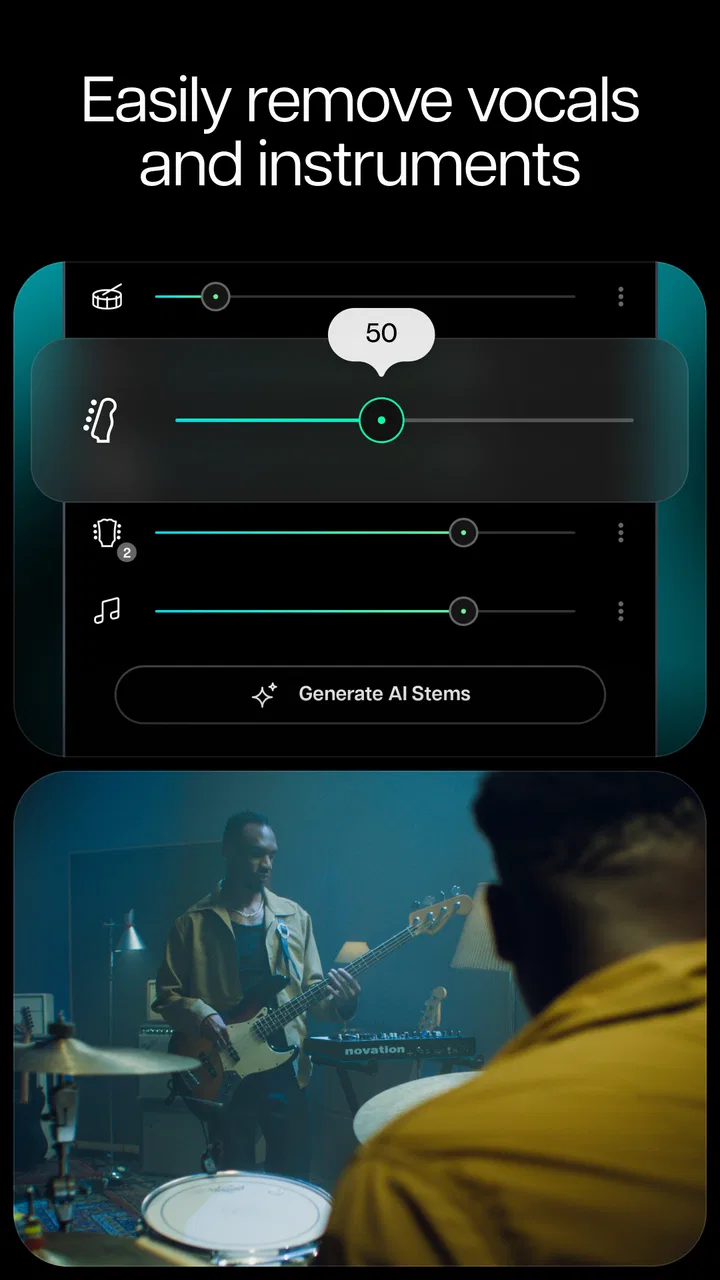
The most useful way to begin is with a specific intention. If I only want to hear a track, a normal music player is simpler. If I want to isolate a vocal, reduce the drums, rehearse a bass line, or build an arrangement around selected parts, Moises gives me a much more practical starting point. Its core job is to separate vocals and instruments from music or other audio into stems that I can work with individually.
That changes the first creative decision. Instead of asking, “What should I create from nothing?” I can ask, “Which part of this recording do I want to study, replace, remove, or answer?” For a guitarist, that might mean lowering the guitar to hear the rhythm section more clearly. For a singer, it could mean creating a backing track with the original lead vocal out of the way. For a teacher, it may mean preparing a focused exercise from a song a student already knows.
I found this starting point more valuable than a generic library of loops because it keeps the musical context intact. The phrasing, timing, and feel of the original performance remain the reference. That matters when I am trying to learn a difficult passage or understand how a particular arrangement works. A detached practice loop can be useful, but a real recording often gives me better clues about dynamics and interaction between parts.
There is also a useful creative trade-off here. Separation is not the same as access to the original studio session. The app works from a finished audio file, so the result is an interpretation of what belongs to each stem. Complex mixes, effects, overlapping frequencies, or dense arrangements can make the parts less clean than a producer’s own project files. I treat the extracted stems as working material, not as untouched master tracks.
A realistic everyday workflow
Imagine I have a rehearsal that evening and need to prepare quickly. I can bring a song into the app, listen to its separated parts, reduce the instrument I play, and rehearse against the remaining arrangement. Rather than spending time searching for a suitable backing track, I can shape the existing recording around the exact part I need to practice.
The same approach works for a vocalist preparing a cover. I would first check whether the vocal separation leaves enough room for my own voice, then listen at several moments instead of judging the result from the opening alone. If a busy chorus produces audible residue, I might keep the original track quieter or use the extracted version mainly for learning and rehearsal rather than public release.
For a songwriter, the app can act as a diagnostic tool. Removing one family of instruments may reveal a gap in the arrangement that was hidden in the full mix. That can suggest where a new counter-melody, percussion part, or vocal response belongs. The insight is not that the app writes the song for me; it helps me hear the structure well enough to make a better decision.
What the separation process is really good at
The strongest use is selective listening. I can focus on a part, mute competing material, and compare the full mix with a reduced version. That is more useful than simply turning down the volume of a track because it gives me a clearer sense of how each part contributes to the whole. It also makes repeated listening less tiring when I am trying to identify a rhythm or phrase.
A less obvious benefit is arrangement education. I can listen to the bass and drums together, then add another element and notice how the groove changes. I can compare the vocal against the harmonic bed without the full production masking small details. This makes the app valuable even when I have no intention of exporting anything. It turns familiar songs into examples I can inspect from several angles.
Another practical insight is to use separation before making creative edits, not after. If I first decide which stems are essential, I avoid building an arrangement around a noisy or incomplete extraction. I would audition the parts in isolation, then in pairs, and finally in the full combination I plan to use. That sequence exposes weaknesses early and saves time later.
Building, testing, and refining an arrangement
Once the source has been opened up, the app becomes more than a listening aid. I can experiment with the balance between parts and decide whether the material supports the idea I have in mind. This is where Moises feels most useful as a bridge between analysis and making: it lets me test a musical direction without immediately committing to a full desktop session.
For example, I might want to practice a new bass line over a familiar drum and harmonic foundation. I can reduce the original bass, keep the rhythmic material present, and play along while listening for clashes. If the new part works, I have a clearer brief for a later recording. If it does not, I have learned that before setting up microphones or opening a larger production environment.
That kind of quick iteration is the app’s creative advantage. It lowers the cost of trying an idea. I can make a rough decision during a commute, between lessons, or before rehearsal, then move to a more complete tool only when the musical direction is worth developing. I would not expect this app alone to replace detailed editing, mixing, or mastering, but I do expect it to help me decide what deserves that extra work.
Using stems for practice instead of performance
Many people will open Moises primarily to play along, and that is where small workflow choices matter. I would prepare a version for the exact skill I am working on rather than trying to create one universal backing track. A drummer may need the harmonic parts and a reduced drum stem. A singer may want the instrumental bed with the lead vocal minimized. A guitarist may benefit from hearing the rhythm section clearly while keeping a guide vocal at a lower level.
This focused approach avoids a common mistake: removing too much. A completely stripped track can make practice feel unnatural because the musical cues that keep the performance grounded have disappeared. I prefer leaving enough of the original arrangement to preserve the song’s shape, especially during transitions. The goal is not always maximum isolation; it is the most useful context for the part I am learning.
I would also listen for artifacts before using a stem in front of other people. Separation can leave traces around consonants, cymbals, sustained notes, or instruments that share a similar range. Those imperfections may be harmless while practicing but distracting in a public performance. For rehearsal, education, and idea generation, the benefit usually outweighs the flaws. For a final commercial backing track, I would compare it carefully with purpose-built stems or a proper multitrack session.
Where iteration becomes less efficient
The app is quick for testing musical alternatives, but repeated experimentation can become less tidy than working in a conventional digital audio workstation. A full production environment is better when I need precise clip editing, detailed automation, complex routing, plug-ins, or a carefully organized project that another engineer can reopen. Moises helps me decide and prepare; it is not the entire production chain.
There is also a quality-versus-speed decision. The faster I want an answer, the more willing I need to be to accept an approximate separation. If I am checking whether a chorus arrangement works, that is a reasonable exchange. If I am preparing audio for release, I would use the app as a reference and then rebuild or replace important parts with cleaner sources wherever possible.
One useful habit is to keep a written note of what I changed between versions. Because the creative process can involve several combinations of stems, it is easy to forget which balance produced the best result. Naming a version by its purpose—practice, arrangement test, rehearsal, or handoff—makes the next step clearer. The app can reveal possibilities, but a little personal organization keeps those possibilities from becoming clutter.
From personal experiment to handoff
Moises becomes more valuable when the output has a destination. I might be preparing a rehearsal aid for a bandmate, a reference for a session musician, a lesson exercise, or a rough arrangement for a producer. In each case, I would decide whether the recipient needs an isolated part, a reduced mix, or simply a clear demonstration of the idea.
That decision affects how much refinement is necessary. A musician learning a line may appreciate a focused stem even if it contains minor artifacts. A collaborator judging the emotional direction of a song may need the full arrangement with one element lowered. A public upload demands more caution, because extracted material can sound less polished than the source and may raise questions about whether I have the right to distribute the underlying recording.
I see the app as strongest when it supports a handoff rather than pretending to finish one. I can use it to communicate an arrangement idea clearly: this is the groove I want, this is the vocal space I am targeting, and this is the part that should be replaced. The recipient then has a more useful brief than a vague message saying that the song should feel “bigger” or “cleaner.”
For that reason, I would not judge an export only by whether it sounds impressive on headphones. I would ask whether it helps the next person act. Does the musician understand what to play? Does the producer know which element is being changed? Does the rehearsal version make the intended cue obvious? A slightly imperfect but well-labeled working file can be more useful than a polished file with no explanation.
Costs, access, and practical expectations
The app is free, which makes it easy to test the central workflow before deciding whether it belongs in a regular creative routine. It also offers in-app purchases ranging from $3.99 to $299.99 per item, so I would check the current purchase choices carefully before building a long-term process around paid capabilities. The broad range means the free starting point and the full paid experience should not be assumed to be identical.
Moises supports devices running Android 9 or later, which is helpful for people using reasonably current phones or tablets, but compatibility still matters if the device is older. I would install it on the device I actually plan to use for rehearsal rather than assuming that a technically supported phone will feel comfortable with larger audio tasks. Screen size, storage habits, headphones, and the way I move files all affect the experience.
The current version is 2.114.0, and keeping an app like this updated can matter because audio workflows depend on stable processing and file handling. I would still avoid updating immediately before an important rehearsal or handoff. Preparing a backup version of the source audio and keeping a copy of any important working material is sensible, especially when the app is part of a deadline-driven process.
How it compares with familiar alternatives
Compared with a standard music player, Moises is much more useful for active listening and practice because I can work with parts rather than only the finished mix. Compared with karaoke or backing-track apps, it offers a more flexible route when the exact song or arrangement I need is not already available in a prepared format. That flexibility is its main reason to exist.
Compared with a digital audio workstation, however, it is more specialized and less suitable as the central workspace for a complete production. A workstation gives me deeper control over recording, editing, effects, arrangement structure, and delivery. I would choose the workstation when the musical idea has survived testing and now needs precision. I would choose Moises earlier, when I am still asking what to keep, remove, learn, or replace.
Compared with manually searching for isolated tracks online, the app is convenient because it starts from the recording I already have. That saves time and keeps the experiment tied to the specific performance I care about. The compromise is that automatically separated material may not match the cleanliness of officially supplied stems. For serious release work, I would prefer original multitracks whenever they are legitimately available.
The app is also not the right choice for someone who wants a complete songwriting partner that invents finished compositions from a blank page. Its value begins with existing audio. If my main goal is recording a band, editing a podcast, sequencing software instruments, or mastering a final mix, another tool will serve that purpose more directly. Moises is best understood as a focused musical workbench for deconstructing and reshaping source material.
My verdict for creators
I recommend Moises to anyone who learns, rehearses, teaches, or arranges by working from real recordings. The ability to pull a song apart changes how quickly I can understand it and how cheaply I can test a new idea. Its most important strength is not a flashy isolated feature; it is the way separation shortens the distance between hearing a possibility and trying it.
I would be more cautious if my goal were a release-ready backing track, a pristine sample, or a fully managed production. The separated audio can be extremely useful while still needing judgment, cleanup, or replacement before it belongs in a final delivery. I would also avoid treating every extracted part as authoritative. Listening critically remains part of the job.
My preferred workflow is simple: start with a clear musical question, inspect the relevant stems, keep enough context for the part to remain playable, test the idea in several sections, and only then hand the material to a larger production tool or another person. That process makes the app feel less like an automatic shortcut and more like a practical assistant for decisions that musicians often make slowly.
For a free Music & Audio app with a Everyone age rating and a large installed audience, it offers a genuinely useful creative entry point. I would install it for practice, arrangement sketches, teaching preparation, and fast collaboration briefs. I would skip it only if I already have clean multitracks or need the detailed control of a full studio environment. For everyone in between, the key advantage is turning a finished recording into something I can actively question, reshape, and use.
That is why I see Moises as more than a way to remove a vocal. It gives me a faster route from listening to understanding, from understanding to experimentation, and from experimentation to a clearer next step. It does not replace musical judgment or a proper production setup, but it makes the early creative work considerably more hands-on.
FAQs for Moises: The Musician's AI App
01What is Moises: The Musician's AI App used for?
Moises is designed for musicians and music enthusiasts to separate vocals and instruments from any song. It uses advanced AI technology to isolate tracks, making it easier for users to practice, remix, or simply enjoy music in a new way. Its intuitive interface caters to both beginners and seasoned musicians.
02How does the AI separation feature work in Moises?
Moises employs cutting-edge AI algorithms to analyze audio tracks and separate them into individual components, such as vocals, drums, bass, and other instruments. This process allows users to customize their listening and practice experience by adjusting the volume of each element or even removing certain parts entirely.
03Is Moises available on both Android and iOS platforms?
Yes, Moises is available for download on both Android and iOS devices. The app provides a seamless experience across platforms, ensuring that users can access its features and updates regardless of their device. This cross-platform availability is ideal for musicians who use different devices for their creative processes.
04Are there any subscription fees or in-app purchases in Moises?
Moises offers both free and premium versions. The free version includes basic features, while the premium subscription unlocks advanced options like higher-quality audio processing and unlimited track uploads. Users can choose the plan that best fits their needs, whether they require occasional use or professional-grade tools.
05Can Moises be used offline?
Moises requires an internet connection to initially process and separate tracks using its AI capabilities. However, once a song has been processed and saved, it can be accessed offline for practice or playback. This feature is convenient for users who want to work on their music projects without constant internet access.
Pros
- Intuitive interface for easy navigation.
- High-quality audio separation features.
- Real-time collaboration with others.
- Supports a wide range of audio formats.
- Regular updates with new features.
Cons
- Some features require a paid subscription.
- Occasional lag in processing tracks.
- Limited offline functionality.
- High battery consumption during use.
- Requires stable internet for best performance.

Moises: The Musician's AI App
Gallery